Work flow to deploy an apple app
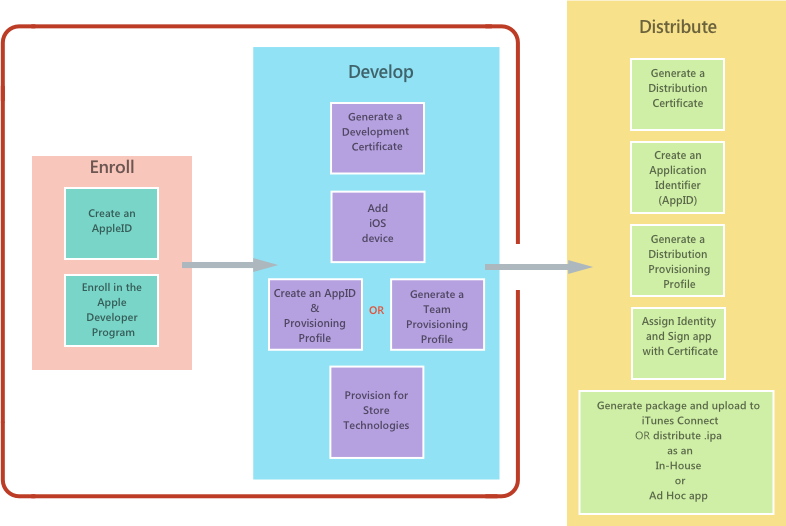
Apple provides the following ways to distribute an iOS application:
- App Store
- In-house (enterprise)
- Ad hoc
- Custom apps for business
All these scenarios require that applications be provisioned using the appropriate provisioning profile. Provisioning profiles are files that contain code signing information, as well as the identity of the application and the intended distribution mechanism. For the non-App Store distribution they also contain information about what devices the app can be deployed to.
App Store distribution
Important - Apple has indicated that starting in March 2019, all apps and updates submitted to the App Store must have been built with the iOS 12.1 SDK or later, included in Xcode 10.1 or later. Apps should also support the iPhone XS and 12.9” iPad Pro screen sizes.
This is the main way that iOS applications are distributed to consumers on iOS devices. All apps submitted to the App Store require approval by Apple.
Apps are submitted to the App Store through a portal called iTunes Connect. The Configure your App in iTunes Connect guide provides more information on how to set up and use this portal to prepare a Xamarin.iOS app for publishing in the App Store.
It is important to note that only developers who belong to the Apple Developer Program have access to iTunes Connect. Members of the Apple Developer Enterprise Program do not have access.
In-house distribution
Sometimes called Enterprise Distribution, in-house distribution allows members of the Apple Developer Enterprise Program to distribute apps internally to other members of the same organization. In-house distribution has the advantages of not requiring an App Store review, and having no limit on the number of devices on which an application can be installed. However, it is important to note that Apple Developer Enterprise Program members do not have access to iTunes Connect, and therefore the licensee is responsible for distributing the app.
Ad-hoc distribution
Sometimes called Enterprise Distribution, in-house distribution allows members of the Apple Developer Enterprise Program to distribute apps internally to other members of the same organization. In-house distribution has the advantages of not requiring an App Store review, and having no limit on the number of devices on which an application can be installed. However, it is important to note that Apple Developer Enterprise Program members do not have access to iTunes Connect, and therefore the licensee is responsible for distributing the app.
Custom apps for business
Apple allows custom distribution of apps to businesses and education. Review the Apple Business Manager User Guide for information.